 NexaPlay
Install NexaPlay on Android
Android phones and tablets · 5 steps · about 2 min
On a phone or tablet, NexaPlay installs from Google Play or directly from the APK file.
- An Android phone or tablet connected to the internet
AInstall the app
-
1
Open Google Play
Press the button above, or open Google Play and search for NexaPlay.
-
2
Install and open
Press Install, then Open.
Prefer the APK file?
- Open nexaplay.app/apk in your browser. The NexaPlay.apk file downloads.
- Open the downloaded file. If the phone asks, allow installs from this source.
- Press Install, then Open.
BAdd your playlist and start watching
-
3
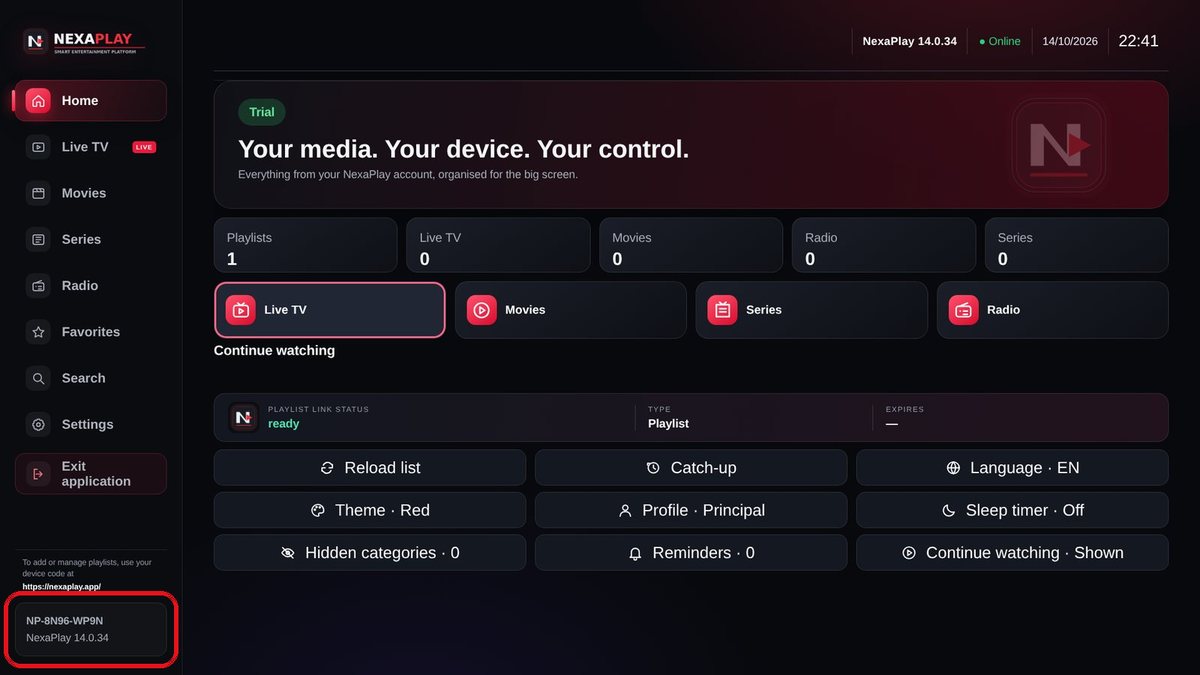
Note the device code
When you open NexaPlay, the unique device code appears at the bottom left (it looks like NP-XXXX-XXXX). Every device has its own code.
-
4
Add your playlist on nexaplay.app
From a phone or computer, go to nexaplay.app/upload-list, enter the code and add your M3U playlist or your Xtream details (server, username, password).
Open Upload List ↗ -
5
Reload the list in the app
Back in NexaPlay, press Reload list. Channels, movies and series appear within seconds.
Every device gets a 7-day trial. If you like it, activate it for life with a single payment, no subscription.
Activate your deviceStill need help?
Write to us and we will reply by email, usually within 24 hours. If it is about a device, add its code.