 NexaPlay
Help
Installation guides
Choose your device and follow the steps. It only takes a few minutes, and at the end you add your playlist and start watching.
After installing: the same 3 steps on every device
NexaPlay is a player. You bring your playlist from your provider, and the app organises it.
-
1
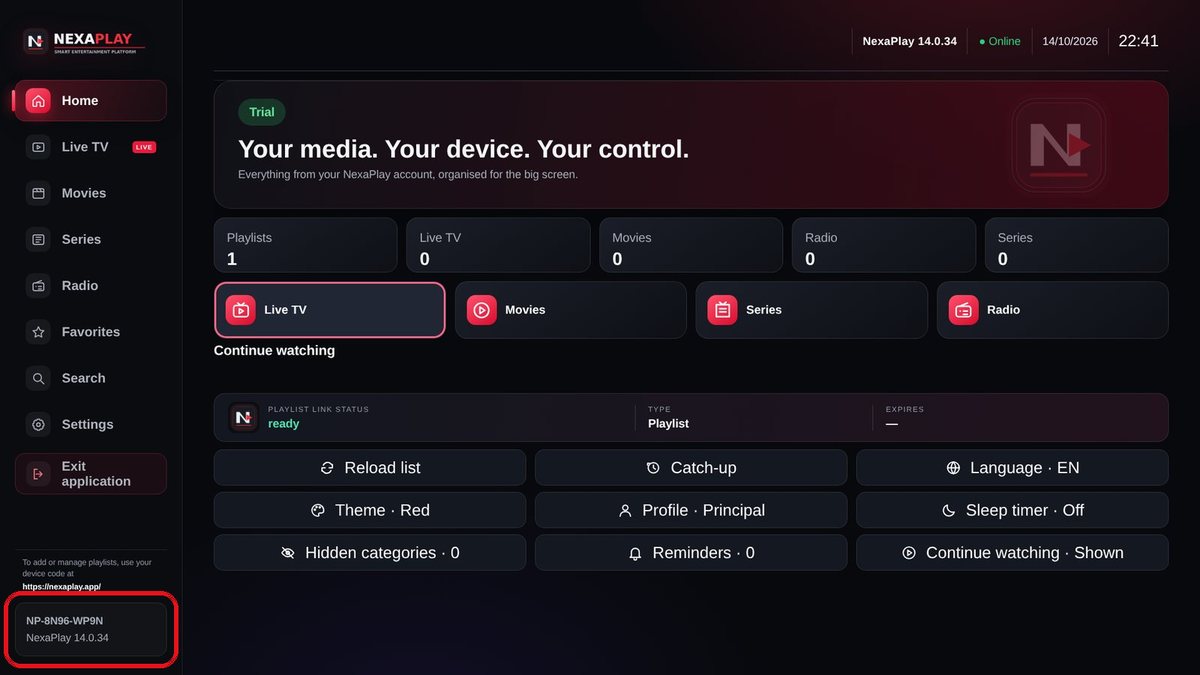
Note the device code
When you open NexaPlay, the unique device code appears at the bottom left (it looks like NP-XXXX-XXXX). Every device has its own code.
-
2
Add your playlist on nexaplay.app
From a phone or computer, go to nexaplay.app/upload-list, enter the code and add your M3U playlist or your Xtream details (server, username, password).
Open Upload List ↗ -
3
Reload the list in the app
Back in NexaPlay, press Reload list. Channels, movies and series appear within seconds.
Still need help?
Write to us and we will reply by email, usually within 24 hours. If it is about a device, add its code.