 NexaPlay
Install NexaPlay on Android TV
Android TV / Google TV televisions and boxes · 6 steps · about 3 min
On Android TV and Google TV, NexaPlay installs from Google Play. For boxes without Google Play there is also an APK option.
- An Android TV television or box connected to the internet
- A Google account on the TV (for Google Play)
AInstall the app
-
1
Open Google Play
On the home screen open Apps → Google Play Store. On Google TV you can use the Search tab directly.
-
2
Search for “NexaPlay”
Type NexaPlay or say “NexaPlay” with voice search.
-
3
Install the app
Press Install, then Open.
Box without Google Play? Install the APK file
- Install the free Downloader app from the box store.
- Allow installs: Settings → Device Preferences → Security & restrictions → Unknown sources → turn on Downloader.
- In Downloader type nexaplay.app/tv and press Go.
- Press Install, then Open.
BAdd your playlist and start watching
-
4
Note the device code
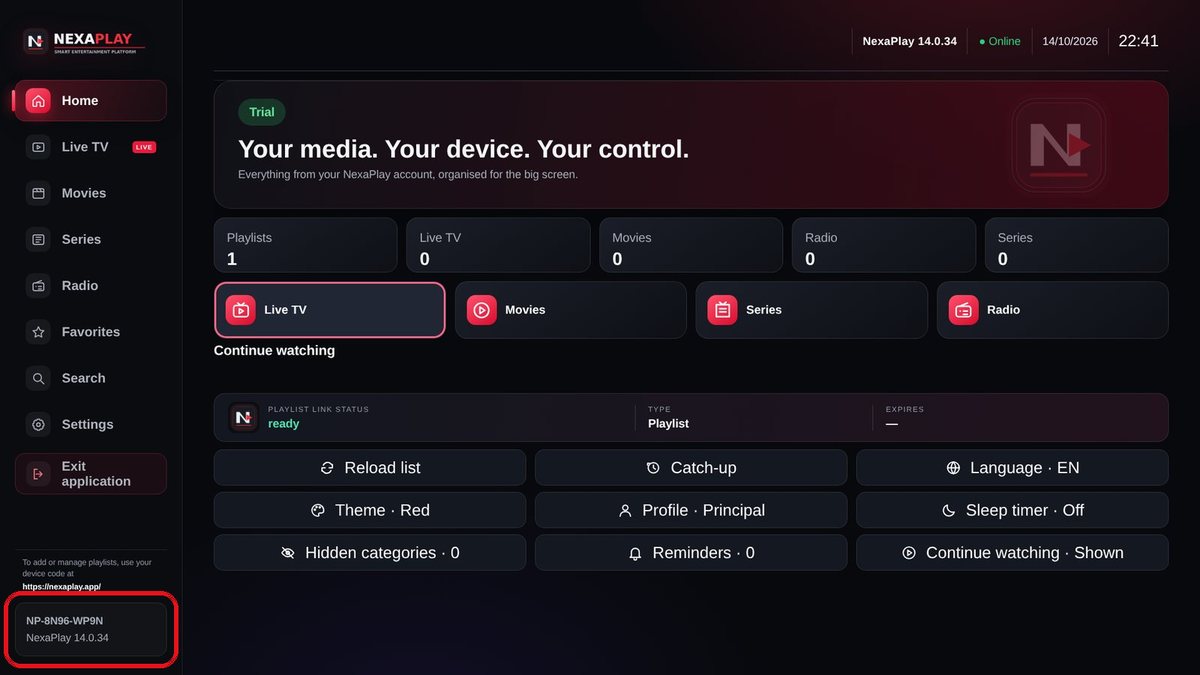
When you open NexaPlay, the unique device code appears at the bottom left (it looks like NP-XXXX-XXXX). Every device has its own code.
-
5
Add your playlist on nexaplay.app
From a phone or computer, go to nexaplay.app/upload-list, enter the code and add your M3U playlist or your Xtream details (server, username, password).
Open Upload List ↗ -
6
Reload the list in the app
Back in NexaPlay, press Reload list. Channels, movies and series appear within seconds.
Every device gets a 7-day trial. If you like it, activate it for life with a single payment, no subscription.
Activate your deviceCommon problems
Google Play says the app is not compatible
Use the APK option above.
Still need help?
Write to us and we will reply by email, usually within 24 hours. If it is about a device, add its code.