 NexaPlay
Install NexaPlay on Fire TV
Fire TV Stick, Fire TV Cube and Fire TV televisions · 8 steps · about 5 min
On Fire TV you can search for NexaPlay directly in the Amazon store. If it is not available in your country, install it in a few minutes with the free Downloader app by following the steps below.
- A Fire TV connected to the internet
- The free Downloader app (from the Amazon store)
Quick option: on the home screen go to Find, type NexaPlay and press Get. If the app appears, you are done. If not, follow the steps below.
AInstall the app
-
1
Install Downloader
On the home screen go to Find → Search, type Downloader and install the free Downloader app.
-
2
Turn on Developer Options
Go to Settings → My Fire TV → About and press the device name (for example Fire TV Stick) 7 times, until a message says you are now a developer.
-
3
Allow installs from Downloader
Back in Settings → My Fire TV → Developer Options → Install unknown apps, switch Downloader ON.
-
4
Type the address nexaplay.app/tv
Open Downloader, select the address field, type nexaplay.app/tv and press Go. The download starts on its own.
-
5
Install and open
When the install window appears, press Install, then Open. Downloader asks whether to delete the downloaded file: choose Delete to free up space.
BAdd your playlist and start watching
-
6
Note the device code
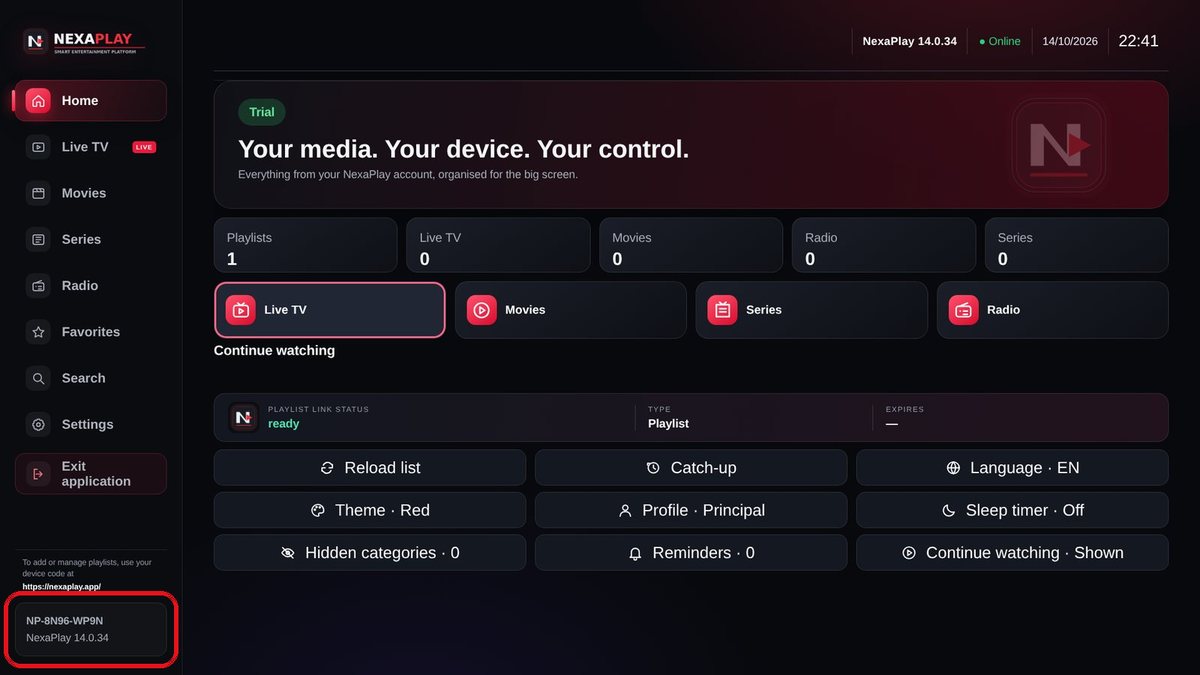
When you open NexaPlay, the unique device code appears at the bottom left (it looks like NP-XXXX-XXXX). Every device has its own code.
-
7
Add your playlist on nexaplay.app
From a phone or computer, go to nexaplay.app/upload-list, enter the code and add your M3U playlist or your Xtream details (server, username, password).
Open Upload List ↗ -
8
Reload the list in the app
Back in NexaPlay, press Reload list. Channels, movies and series appear within seconds.
Every device gets a 7-day trial. If you like it, activate it for life with a single payment, no subscription.
Activate your deviceCommon problems
I cannot find “Developer Options”
On newer Fire TV devices the menu only appears after pressing the device name 7 times in Settings → My Fire TV → About. Go back and open My Fire TV again.
Downloader does not download the file
Check that you typed exactly nexaplay.app/tv, without spaces. You can also type the full address: https://nexaplay.app/downloads/NexaplayTv.apk
How do I find the app after installing?
Hold the Home button on the remote and choose Apps. NexaPlay is at the end; you can move it to the home screen.
Still need help?
Write to us and we will reply by email, usually within 24 hours. If it is about a device, add its code.