 NexaPlay
Install NexaPlay on Samsung TV
Samsung Smart TVs (Tizen) · 7 steps · about 3 min
NexaPlay installs straight from the Samsung TV app store. You do not need a stick or any other device.
- A Samsung Smart TV connected to the internet
- The TV remote
AInstall the app
-
1
Connect the TV to the internet
Open Settings → General → Network and check that the TV is connected by Wi-Fi or cable.
-
2
Open Apps
Press the Home button on the remote and choose Apps from the bar at the bottom.
-
3
Search for “NexaPlay”
Select the magnifying glass at the top and type NexaPlay with the on-screen keyboard.
-
4
Install the app
Open NexaPlay from the results and press Install. Once installed, the app also appears in the bar on the home screen.
BAdd your playlist and start watching
-
5
Note the device code
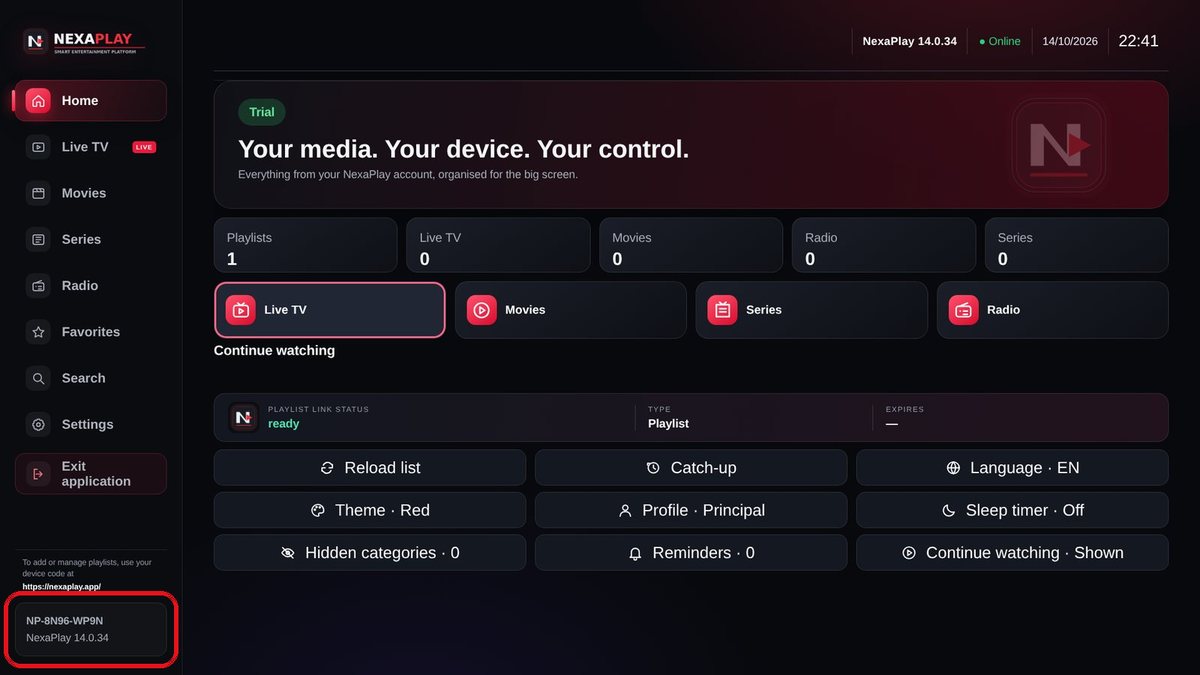
When you open NexaPlay, the unique device code appears at the bottom left (it looks like NP-XXXX-XXXX). Every device has its own code.
-
6
Add your playlist on nexaplay.app
From a phone or computer, go to nexaplay.app/upload-list, enter the code and add your M3U playlist or your Xtream details (server, username, password).
Open Upload List ↗ -
7
Reload the list in the app
Back in NexaPlay, press Reload list. Channels, movies and series appear within seconds.
Every device gets a 7-day trial. If you like it, activate it for life with a single payment, no subscription.
Activate your deviceCommon problems
I cannot find NexaPlay in Apps
Update the TV software (Settings → Support → Software update) and search again. Some very old models, or TVs from certain countries, do not have access to every app. If it still does not appear, send us the TV model.
The app closed or does not start
Unplug the TV for 30 seconds, then turn it back on and open NexaPlay.
Still need help?
Write to us and we will reply by email, usually within 24 hours. If it is about a device, add its code.